Bạn mua key nào?
Kết nối
| Base URL | https://api.nghimmo.com |
| Key | sk-xxxxxxxxxxxx |
/v1. Riêng Cursor Pro thì thêm /v1.Model
Mạnh nhất, cho việc khó. Mới nhất: nghi/claude-opus-5.5.
nghi/claude-opus-5.5
nghi/claude-opus-5
nghi/claude-opus-4.8
nghi/claude-opus-4.7
nghi/claude-opus-4.6Fable — agent coding. Mới nhất: nghi/claude-fable-5.1.
nghi/claude-fable-5.1
nghi/claude-fable-5Dùng hằng ngày. Mới nhất: nghi/claude-sonnet-5.5 (nhanh hơn). Mặc định: nghi/claude-sonnet-5.
nghi/claude-sonnet-5.5
nghi/claude-sonnet-5Việc nhẹ, rẻ token.
nghi/claude-haiku-4.5Cài đặt
- Cài Claude Desktop: claude.com/download — không dùng Microsoft Store.
- Tải tool → chọn Desktop → dán key → Áp dụng:
- Mở lại app → Continue with Gateway.
Máy chặn khi mở tool: macOS chuột phải → Open · Windows → More info → Run anyway. Linux: dùng tab Linux (Claude Desktop ít hỗ trợ Linux).
[1m] (1M context). CLI cấu hình riêng — trong tool chọn mode CLI (không dùng chung Apply Desktop).Mac — tool báo OK nhưng không thấy Gateway
- Cài Claude từ .dmg tại claude.com/download — không App Store.
- Cmd+Q thoát hẳn Claude trước khi chạy tool.
- Nếu double-click không chạy, mở Terminal:
cd ~/Downloads
xattr -d com.apple.quarantine ClaudeKeyTool.command 2>/dev/null
chmod +x ClaudeKeyTool.command
bash ClaudeKeyTool.commandKiểm tra config đã ghi:
ls ~/Library/Application\ Support/Claude-3p/configLibrary/
cat ~/Library/Application\ Support/Claude-3p/configLibrary/_meta.jsonMở Claude → chọn Continue with Gateway (không đăng nhập claude.ai). Log tool: ~/Library/Logs/claude-key-tool.log
npm install -g @anthropic-ai/claude-code- Chạy ClaudeKeyTool → chọn CLI → dán key → Áp dụng:
[1m] (một số bản Claude Code lỗi khi env có [1m]). Muốn 1M: /model nghi/claude-opus-5[1m] nếu bản CLI hỗ trợ.Cấu hình tay
Sửa ~/.claude/settings.json:
{
"env": {
"ANTHROPIC_BASE_URL": "https://api.nghimmo.com",
"ANTHROPIC_AUTH_TOKEN": "sk-xxxxxxxxxxxx",
"ANTHROPIC_MODEL": "nghi/claude-sonnet-5",
"ANTHROPIC_DEFAULT_OPUS_MODEL": "nghi/claude-opus-5",
"ANTHROPIC_DEFAULT_SONNET_MODEL": "nghi/claude-sonnet-5",
"ANTHROPIC_SMALL_FAST_MODEL": "nghi/claude-haiku-4.5",
"ANTHROPIC_DEFAULT_HAIKU_MODEL": "nghi/claude-haiku-4.5",
"CLAUDE_CODE_ENABLE_GATEWAY_MODEL_DISCOVERY": "1",
"CLAUDE_CODE_USE_GATEWAY": "1",
"CLAUDE_CODE_DISABLE_REFUSAL_FALLBACK": "1",
"API_TIMEOUT_MS": "600000"
}
}ANTHROPIC_API_KEY để trống — chỉ dùng ANTHROPIC_AUTH_TOKEN. Timeout 10 phút (API_TIMEOUT_MS=600000). GATEWAY_MODEL_DISCOVERY lấy list model từ gateway.[1m] vào env (tránh lỗi một số bản Claude Code). Muốn hiện /1M: /model nghi/claude-opus-5[1m] rồi restart CLI. Server đã strip [1m] khi nhận request.- Cài Node.js 18+ rồi:
npm install -g @anthropic-ai/claude-code - Tải script Linux → chạy trong Terminal:
chmod +x ClaudeKeyTool.sh ./ClaudeKeyTool.sh sk-xxxxxxxxxxxx - Chạy
claude. Nếu cần đổi model:/model nghi/claude-sonnet-5[1m]
VS Code / Cursor / Codium trên Linux: cài extension Claude Code → chạy cùng script ở trên → Ctrl+Shift+P → Reload Window.
Cấu hình tay (không dùng script)
Sửa ~/.claude/settings.json:
{
"env": {
"ANTHROPIC_BASE_URL": "https://api.nghimmo.com",
"ANTHROPIC_AUTH_TOKEN": "sk-xxxxxxxxxxxx",
"ANTHROPIC_MODEL": "nghi/claude-sonnet-5[1m]",
"ANTHROPIC_DEFAULT_OPUS_MODEL": "nghi/claude-opus-5[1m]",
"ANTHROPIC_DEFAULT_SONNET_MODEL": "nghi/claude-sonnet-5[1m]",
"ANTHROPIC_SMALL_FAST_MODEL": "nghi/claude-haiku-4.5[1m]",
"ANTHROPIC_DEFAULT_HAIKU_MODEL": "nghi/claude-haiku-4.5[1m]",
"CLAUDE_CODE_ENABLE_GATEWAY_MODEL_DISCOVERY": "1",
"CLAUDE_CODE_USE_GATEWAY": "1",
"CLAUDE_CODE_DISABLE_REFUSAL_FALLBACK": "1",
"API_TIMEOUT_MS": "600000"
}
}Test nhanh bằng curl
curl https://api.nghimmo.com/v1/messages \
-H "x-api-key: sk-xxxxxxxxxxxx" \
-H "anthropic-version: 2023-06-01" \
-H "content-type: application/json" \
-d '{"model":"nghi/claude-opus-4.8","max_tokens":64,"messages":[{"role":"user","content":"ping"}]}'./ClaudeKeyTool.sh --reset- Cài extension Claude Code (Anthropic) trong VS Code / Cursor / Antigravity.
- Chạy ClaudeKeyTool → chọn mode CLI (không chọn Desktop) → dán key → Áp dụng:
- Thoát hẳn Antigravity/VS Code rồi mở lại, hoặc
Cmd+Shift+P/Ctrl+Shift+P→ Reload Window.
Mac Antigravity — vẫn không ăn key
cat ~/.claude/settings.json | grep -E 'ANTHROPIC_BASE_URL|ANTHROPIC_AUTH_TOKEN'
rm -rf ~/Library/Application\ Support/Antigravity/User/globalStorage/anthropic.claude-code
# rồi Reload Window trong Antigravity/v1/messages), hoặc Chatbox chọn provider Claude.Override OpenAI Base URL chỉ dành cho key Codex / DeepSeek.
- Chatbox → Settings → Model Provider → Claude
- API Host
https://api.nghimmo.com/v1· Keysk-... - Thêm
nghi/claude-opus-4.8→ Test Model
Kết nối
| Base URL | https://api.nghimmo.com/v1 |
| Key | sk-xxxxxxxxxxxx |
/v1. Key Grok không chạy Claude Code.Model
Không chọn gì thì mặc định nghi/grok-4.5.
| Model | Dùng khi |
|---|---|
| nghi/grok-4.5 | Mạnh nhất — code, agent |
| nghi/grok-4.3 | Context 1M, rẻ hơn |
| nghi/grok-4.20-0309-reasoning | Có suy luận |
| nghi/grok-4.20-0309-non-reasoning | Nhanh, rẻ |
| nghi/grok-4.20-multi-agent-0309 | Nghiên cứu sâu |
| nghi/grok-build-0.1 | Code / agent |
| nghi/grok-composer-2.5-fast | Code nhanh trong Cursor |
| nghi/grok-4.5-latest nghi/grok-build-latest | Alias của grok-4.5 |
| nghi/grok-3-mini nghi/grok-3-mini-fast | Legacy |
Cài đặt
Ctrl+Shift+J→ Models- Bật Override OpenAI Base URL →
https://api.nghimmo.com/v1 - Dán key → Verify → thêm
nghi/grok-4.5
Cline / Roo Code: Settings → API Provider OpenAI Compatible → điền:
Base URL : https://api.nghimmo.com/v1
API Key : sk-xxxxxxxxxxxx
Model : nghi/grok-4.5Continue: sửa ~/.continue/config.yaml:
models:
- name: Nghimmo Grok
provider: openai
model: nghi/grok-4.5
apiBase: https://api.nghimmo.com/v1
apiKey: sk-xxxxxxxxxxxxLobeChat, NextChat, Open WebUI… — mọi app OpenAI compatible:
Base URL : https://api.nghimmo.com/v1
API Key : sk-xxxxxxxxxxxx
Model : nghi/grok-4.5- Chatbox → Settings → Model Provider → OpenAI API Compatible
- API Host
https://api.nghimmo.com/v1· Keysk-... - Thêm
nghi/grok-4.5→ Test
Kết nối
| Base URL | https://api.nghimmo.com/v1 |
| Key | sk-xxxxxxxxxxxx |
/v1. Key Codex không chạy Claude Code.Model
| Model | Dùng khi |
|---|---|
| nghi/gpt-5.6-sol | Mạnh nhất, tốn token |
| nghi/gpt-5.6-terra | Cân bằng — code / agent |
| nghi/gpt-5.6-luna | Nhanh, rẻ |
| nghi/gpt-5.5 | Mặc định — ổn định |
Cài đặt
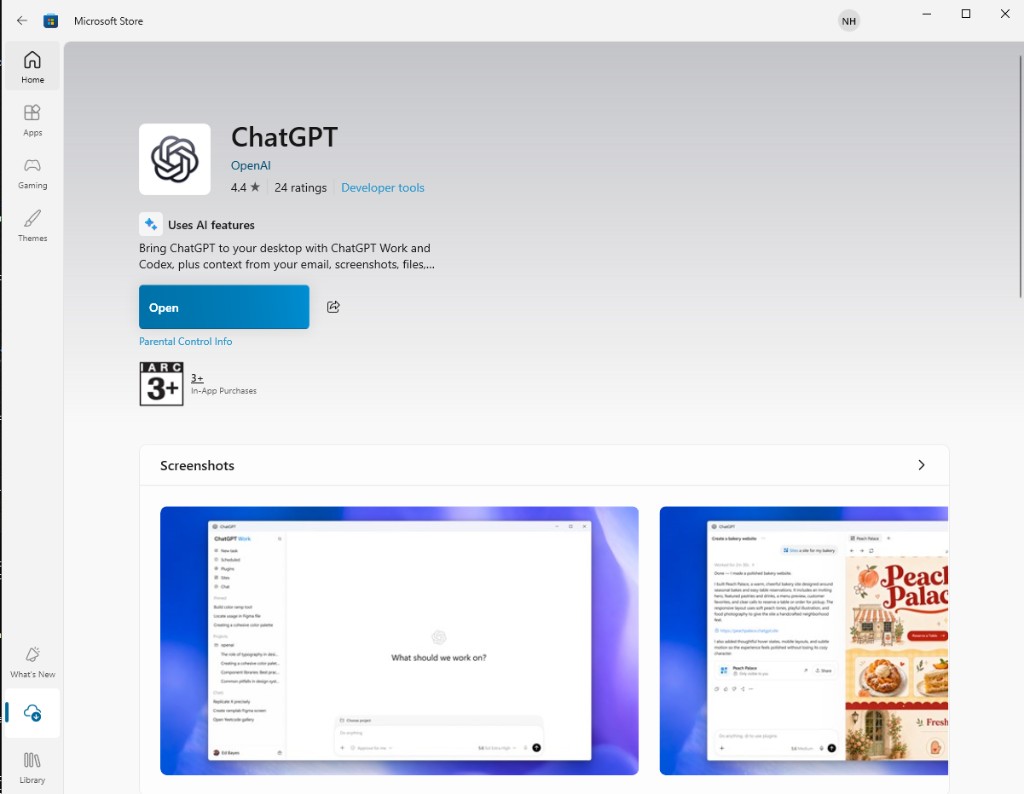
- Cài ChatGPT từ Microsoft Store (của OpenAI).
- Tải tool → Desktop → dán key → Đăng nhập:
- Tắt hẳn ChatGPT, mở lại → dùng ChatGPT Work / Codex.
- Cài Codex CLI (theo hướng dẫn OpenAI / npm nếu bạn dùng bản CLI).
- Tải script → chạy:
chmod +x CodexKeyTool.sh ./CodexKeyTool.sh sk-xxxxxxxxxxxx codex
Extension Codex (VS Code) trên Linux: cài extension → chạy script ở trên → tắt hẳn VS Code rồi mở lại.
Missing environment variable: 'OPENAI_API_KEY': tải lại CodexKeyTool.sh (bản ≥1.0.1) → chạy lại với key → tắt hẳn VS Code/terminal rồi mở lại. Script sẽ ghi env vào shell rc + ~/.config/environment.d/.Cấu hình tay (~/.codex)
~/.codex/auth.json:
{
"auth_mode": "apikey",
"OPENAI_API_KEY": "sk-xxxxxxxxxxxx"
}Đồng thời export env (Codex bắt buộc có biến môi trường thật):
echo 'export OPENAI_API_KEY="sk-xxxxxxxxxxxx"' >> ~/.bashrc
source ~/.bashrc~/.codex/config.toml (rút gọn):
model = "gpt-5.6-terra"
model_provider = "Nghimmo"
sandbox_mode = "danger-full-access"
approval_policy = "never"
[model_providers.Nghimmo]
name = "Nghimmo"
base_url = "https://api.nghimmo.com/v1"
env_key = "OPENAI_API_KEY"
wire_api = "responses"Test nhanh bằng curl
curl https://api.nghimmo.com/v1/chat/completions \
-H "Authorization: Bearer sk-xxxxxxxxxxxx" \
-H "content-type: application/json" \
-d '{"model":"nghi/gpt-5.5","messages":[{"role":"user","content":"ping"}]}'./CodexKeyTool.sh --resetCtrl+Shift+J→ Models- Bật Override OpenAI Base URL →
https://api.nghimmo.com/v1 - Dán key → Verify → thêm
nghi/gpt-5.5
Extension Codex (OpenAI) trên VS Code:
- Cài extension Codex (OpenAI) trong VS Code.
- Tải tool → chọn CLI → dán key → Đăng nhập:
- Tắt hẳn VS Code → mở lại → chat Codex mới.
%USERPROFILE%\.codex\config.toml, đảm bảo sandbox = "unelevated" trong [windows], rồi chạy lại tool hoặc sửa tay.Cline / Roo Code: Settings → API Provider OpenAI Compatible → điền:
Base URL : https://api.nghimmo.com/v1
API Key : sk-xxxxxxxxxxxx
Model : nghi/gpt-5.5Continue: sửa ~/.continue/config.yaml:
models:
- name: Nghimmo Codex
provider: openai
model: nghi/gpt-5.5
apiBase: https://api.nghimmo.com/v1
apiKey: sk-xxxxxxxxxxxxLobeChat, NextChat, Open WebUI… — mọi app OpenAI compatible:
Base URL : https://api.nghimmo.com/v1
API Key : sk-xxxxxxxxxxxx
Model : nghi/gpt-5.5- Chatbox → Settings → Model Provider → OpenAI API Compatible
- API Host
https://api.nghimmo.com/v1· Keysk-... - Thêm
nghi/gpt-5.5→ Test
Kết nối
| Base URL — Claude Code | https://api.nghimmo.com |
| Base URL — OpenAI compatible | https://api.nghimmo.com/v1 |
| Key | sk-xxxxxxxxxxxx |
/v1, app OpenAI có /v1./v1/responses → không dùng được Codex CLI / Codex extension.Model
| Model | Ghi chú |
|---|---|
| nghi/deepseek-v4.1-flash | DeepSeek V4.1 Flash — nhanh, code + chat (mặc định) |
| nghi/glm-5.3-flash | GLM 5.3 Flash — nhanh, code + chat |
| nghi/glm-5.3-flash | GLM 5.3 Flash — nhanh, code + chat |
/model nghi/glm-5.3-flash. Gọi sai tên model → báo lỗi kèm danh sách model đúng (xem bằng GET /v1/models).Cài đặt
- Claude Desktop: cài từ claude.com/download. Claude Code CLI:
npm install -g @anthropic-ai/claude-code. - Tải DeepSeekKeyTool → dán key DeepSeek → Áp dụng (1 lần cho cả Desktop + CLI):
- Claude Desktop: mở lại → Continue with Gateway. Claude Code: chạy
claude. VS Code / Cursor / Antigravity:Ctrl+Shift+P→ Reload Window.
Máy chặn khi mở tool: Windows → More info → Run anyway · macOS chuột phải → Open · Linux: chmod +x DeepSeekKeyTool.sh && ./DeepSeekKeyTool.sh (chỉ cấu hình CLI).
npm install -g @anthropic-ai/claude-code- Sửa
~/.claude/settings.json(Windows:%USERPROFILE%\.claude\settings.json):{ "env": { "ANTHROPIC_BASE_URL": "https://api.nghimmo.com", "ANTHROPIC_AUTH_TOKEN": "sk-xxxxxxxxxxxx", "ANTHROPIC_MODEL": "nghi/deepseek-v4.1-flash", "ANTHROPIC_DEFAULT_OPUS_MODEL": "nghi/deepseek-v4.1-flash", "ANTHROPIC_DEFAULT_SONNET_MODEL": "nghi/deepseek-v4.1-flash", "ANTHROPIC_DEFAULT_HAIKU_MODEL": "nghi/deepseek-v4.1-flash", "ANTHROPIC_SMALL_FAST_MODEL": "nghi/deepseek-v4.1-flash", "API_TIMEOUT_MS": "600000" } } - Chạy
claude. Extension Claude Code trong VS Code / Cursor / Antigravity dùng chung file này →Ctrl+Shift+P→ Reload Window.
ANTHROPIC_API_KEY để trống — chỉ dùng ANTHROPIC_AUTH_TOKEN. Base URL không có /v1.Cline / Roo Code: Settings → API Provider OpenAI Compatible → điền:
Base URL : https://api.nghimmo.com/v1
API Key : sk-xxxxxxxxxxxx
Model : nghi/deepseek-v4.1-flashContinue: sửa ~/.continue/config.yaml:
models:
- name: Nghimmo DeepSeek
provider: openai
model: nghi/deepseek-v4.1-flash
apiBase: https://api.nghimmo.com/v1
apiKey: sk-xxxxxxxxxxxxCtrl+Shift+J→ Models- Bật Override OpenAI Base URL →
https://api.nghimmo.com/v1 - Dán key → Verify → thêm model
nghi/deepseek-v4.1-flash
LobeChat, NextChat, Open WebUI, Chatbox (provider OpenAI API Compatible)… — mọi app OpenAI compatible:
Base URL : https://api.nghimmo.com/v1
API Key : sk-xxxxxxxxxxxx
Model : nghi/deepseek-v4.1-flashTest nhanh bằng cURL:
curl https://api.nghimmo.com/v1/chat/completions \
-H "Authorization: Bearer sk-xxxxxxxxxxxx" \
-H "Content-Type: application/json" \
-d '{"model":"nghi/deepseek-v4.1-flash","messages":[{"role":"user","content":"Hello"}]}'Tiết kiệm token
/clearkhi đổi việc ·/compactmỗi 30–50 lượt · lỗi "context quá dài" →/clear· tab mới vẫn lỗi → tắt bớt MCP/tools trong IDE- Chỉ đính kèm file cần, cắt log dài
- Việc đơn giản → Haiku / gpt-5.6-luna / deepseek-v4.1-flash
Token còn lại
Dán key vào trang check là thấy.
Kiểm tra key